
WhatsApp Business App vs WhatsApp Business API is one of the most common comparisons businesses make when deciding how to communicate with customers on WhatsApp. While both solutions are developed by Meta, they serve different business needs. If you’re new to the platform, first read our complete guide on What is WhatsApp Business API?
In this guide, you’ll learn the key differences between the WhatsApp Business App and WhatsApp Business API, including pricing, automation, features, limitations, and which option is the best fit for your business in 2026.
At first glance, they may seem similar because both help businesses communicate with customers on WhatsApp. However, they are designed for completely different business needs.
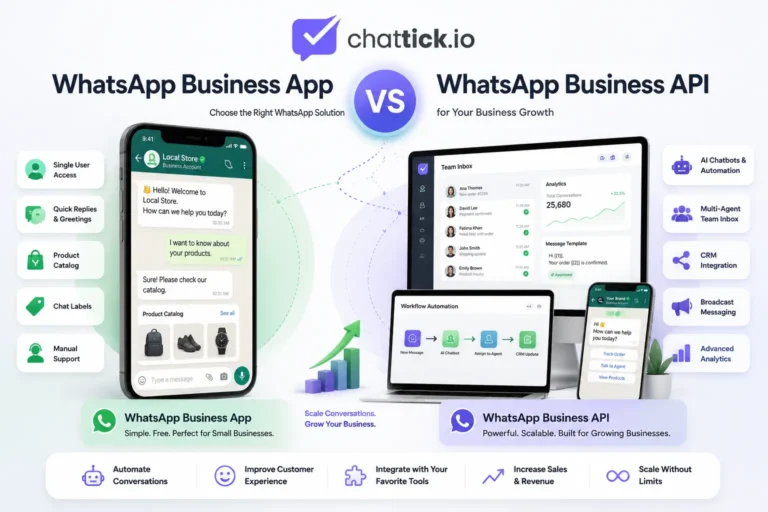
The WhatsApp Business App is a free mobile application built for small businesses that manage customer conversations manually. In contrast, WhatsApp Business API is a scalable business messaging solution that supports automation, CRM integrations, multiple agents, AI chatbots, and high-volume customer communication.
Choosing the wrong option can limit your business growth, while choosing the right one can improve customer support, marketing campaigns, lead management, and sales automation.
In this guide, you’ll learn the differences between WhatsApp Business App and WhatsApp Business API, compare their features, understand their limitations, and discover which option is best for your business.
Quick Answer
If you only need to reply to customers manually and receive a small number of messages every day, WhatsApp Business App is usually enough.
However, if your business is growing and you need features like:
- Multiple team members handling chats
- CRM integration
- AI chatbots
- Automated replies
- Broadcast campaigns
- Customer journey automation
- Advanced reporting
- Integration with business software
then WhatsApp Business API is the better choice.
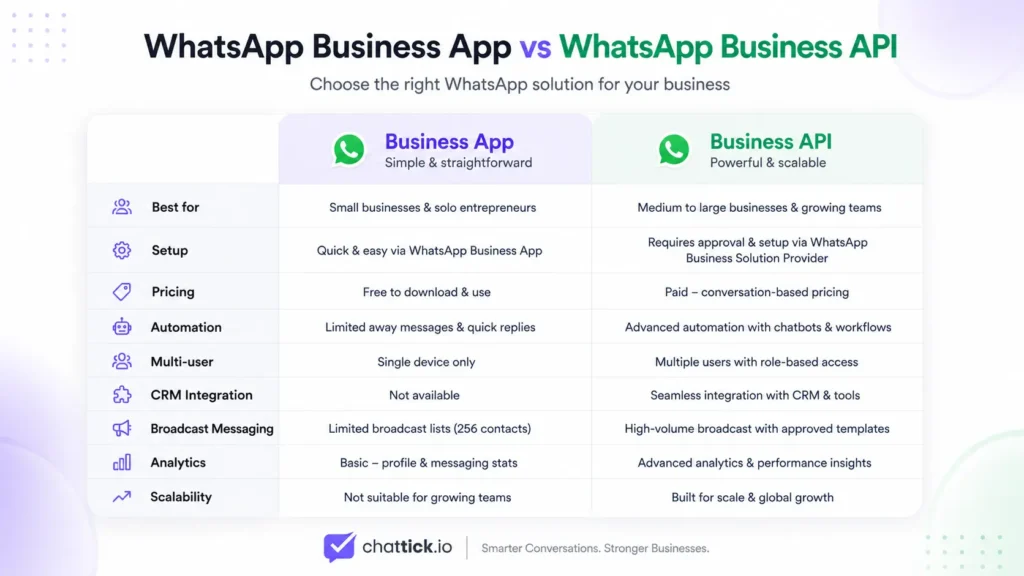
Here’s a quick comparison.
| Feature | WhatsApp Business App | WhatsApp Business API |
|---|---|---|
| Best For | Small businesses | Growing & enterprise businesses |
| Cost | Free | Paid (Meta conversation charges + provider fees) |
| Multiple Users | Limited | Yes |
| Automation | Basic | Advanced |
| AI Chatbots | No | Yes |
| CRM Integration | No | Yes |
| Broadcast Messaging | Limited | Large-scale campaigns |
| APIs | No | Yes |
| Team Inbox | Limited | Yes |
| Scalable | Limited | Yes |
What Is WhatsApp Business App?
WhatsApp Business App is a free application developed by Meta for small businesses that want to communicate with customers using WhatsApp.
It offers useful business features while keeping the interface almost identical to the regular WhatsApp Messenger app. This makes it easy for business owners to start using it without additional training.
The app is ideal for businesses that receive a manageable number of customer inquiries and don’t require advanced automation.
Key Features
The WhatsApp Business App includes several tools designed for everyday business communication:
- Business Profile
- Product Catalog
- Labels for organizing chats
- Quick Replies
- Greeting Messages
- Away Messages
- Click-to-Chat Links
- Basic Broadcast Lists
- Status Updates
These features are enough for businesses that mainly communicate one-on-one with customers.
Who Should Use WhatsApp Business App?
The Business App is suitable for businesses such as:
- Local restaurants
- Retail shops
- Freelancers
- Tutors
- Consultants
- Home-based businesses
- Small service providers
If one person manages customer conversations every day, the Business App is often the simplest and most cost-effective solution.
Limitations of WhatsApp Business App
Although the app is useful, it has limitations that become noticeable as your business grows.
Common limitations include:
- Limited support for multiple team members
- No advanced chatbot capabilities
- No CRM integration
- Limited workflow automation
- Basic analytics
- Manual customer management
- Not suitable for handling thousands of customer conversations
Once these limitations start affecting your operations, businesses typically consider moving to WhatsApp Business API.
What Is WhatsApp Business API?
WhatsApp Business API is a business messaging solution provided by Meta that enables companies to communicate with customers at scale.
Unlike the WhatsApp Business App, the API doesn’t have its own user interface. Instead, it connects with customer communication platforms, CRMs, helpdesk software, and automation tools through integrations.
This makes it possible to build powerful customer communication systems without relying on manual messaging.
Businesses use WhatsApp Business API to:
- Automate customer support
- Send appointment reminders
- Deliver order updates
- Verify user accounts with OTPs
- Run marketing campaigns
- Qualify leads automatically
- Integrate with CRM systems
- Connect AI chatbots
- Manage conversations across multiple agents
Rather than simply sending messages, the API becomes part of a complete customer engagement workflow.
Key Features of WhatsApp Business API
Some of the most valuable features include:
- Multi-agent support
- AI chatbot integration
- CRM integration
- Marketing message campaigns
- Utility notifications
- Authentication messages
- Customer segmentation
- Advanced automation
- Team inbox
- Analytics and reporting
- Webhooks and APIs
- Integration with platforms like HubSpot, Salesforce, Zoho, GoHighLevel, and custom business systems
These capabilities make WhatsApp Business API suitable for businesses that need speed, automation, and scalability.
Who Should Use WhatsApp Business API?
The API is designed for businesses that handle a high volume of customer conversations or want to automate repetitive communication.
Examples include:
- E-commerce stores
- Healthcare providers
- Educational consultants
- Travel agencies
- Real estate companies
- Banks
- Insurance companies
- SaaS businesses
- Large customer support teams
- Enterprises with multiple departments
If your business relies on WhatsApp for lead generation, customer support, or sales, the API provides the flexibility required to grow efficiently.
WhatsApp Business App vs WhatsApp Business API: Detailed Comparison
Although both solutions help businesses communicate with customers on WhatsApp, they are built for different stages of business growth.
The following comparison highlights the most important differences.
| Feature | WhatsApp Business App | WhatsApp Business API |
|---|---|---|
| Purpose | Manual customer communication | Scalable business messaging |
| Best For | Small businesses | Growing businesses and enterprises |
| Pricing | Free | Meta conversation charges plus BSP/platform fees |
| Users | Best for a single user or a very small team | Supports multiple agents and teams |
| Automation | Basic greeting and away messages | Advanced workflows, bots, and AI automation |
| Chatbots | Not supported | Fully supported |
| CRM Integration | No | Yes |
| Marketing Campaigns | Limited | Large-scale campaigns using approved templates |
| Analytics | Basic | Advanced reporting and performance tracking |
| Scalability | Limited | Designed for high-volume customer communication |
As your customer base grows, the gap between the Business App and the API becomes more noticeable. Businesses that need faster response times, team collaboration, and automation generally benefit from upgrading to the API.
WhatsApp Business App vs WhatsApp Business API: Key Differences, Features & Which One to Choose (2026 Guide)
Key Differences Between WhatsApp Business App and WhatsApp Business API
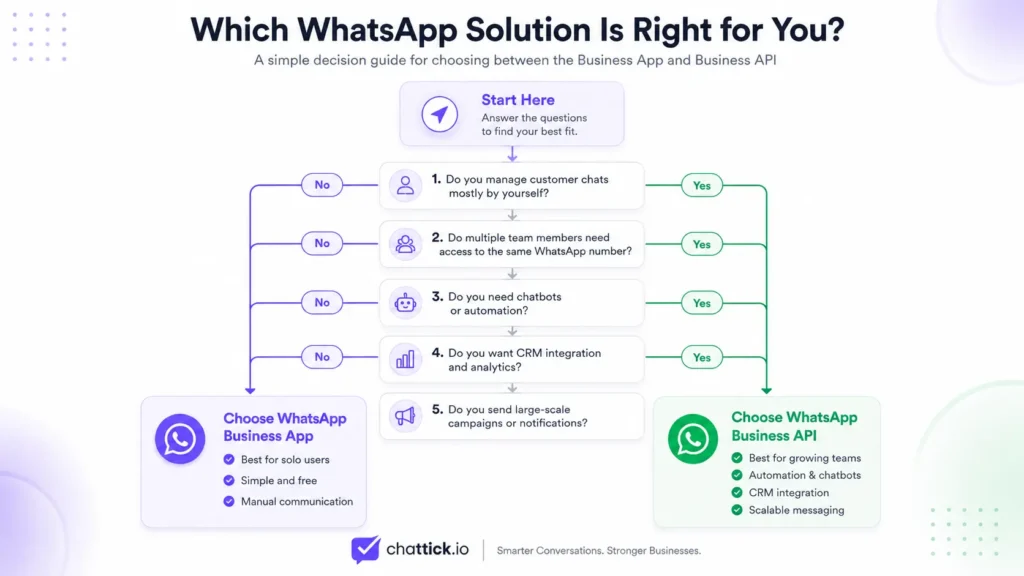
Although both solutions are designed to help businesses communicate with customers on WhatsApp, they serve different purposes. The WhatsApp Business App is ideal for small businesses that manage conversations manually, while WhatsApp Business API is built for growing businesses that need automation, multiple agents, CRM integration, and large-scale customer communication.
Below is a detailed comparison of the two solutions.
1. Target Audience
The first major difference is the type of business each solution is designed for.
WhatsApp Business App is suitable for:
- Small businesses
- Local shops
- Freelancers
- Restaurants
- Home-based businesses
- Individual service providers
These businesses usually receive a manageable number of customer messages every day and can respond manually.
WhatsApp Business API is designed for:
- Medium-sized businesses
- Large enterprises
- E-commerce stores
- Healthcare organizations
- Educational institutions
- Banks and financial services
- Real estate companies
- Travel agencies
- Customer support teams
Businesses that handle hundreds or thousands of conversations every day require automation, collaboration, and integrations that are only available through the API.
2. Setup Process
Getting started with each solution is very different.
WhatsApp Business App
Setting up the app is quick and simple.
You only need to:
- Download the app
- Register your business number
- Verify your phone number
- Create your business profile
The entire process usually takes only a few minutes.
WhatsApp Business API
The API requires a more advanced setup.
Businesses typically need to:
- Create a Meta Business Account
- Verify the business
- Connect a WhatsApp Business Account (WABA)
- Configure the Cloud API or work with a Business Solution Provider (BSP)
- Connect automation tools or CRM systems
Although setup takes longer, it unlocks enterprise-level messaging capabilities.
3. Automation Capabilities
Automation is where the biggest difference exists.
WhatsApp Business App
The app provides only basic automation features, including:
- Greeting messages
- Away messages
- Quick replies
Everything else still requires manual interaction.
If your team receives hundreds of inquiries every day, these features quickly become limiting.
WhatsApp Business API
The API supports advanced automation such as:
- AI-powered chatbots
- Automated lead qualification
- Appointment booking
- Order confirmations
- Payment reminders
- Customer support workflows
- Marketing campaigns
- CRM-triggered messages
- Workflow automation
- Personalized customer journeys
Businesses can automate large portions of their customer communication while still delivering a personalized experience.
4. Multi-Agent Support
As businesses grow, multiple employees often need access to the same WhatsApp number.
WhatsApp Business App
The Business App is intended for limited usage.
While Meta has introduced companion device support, it is still not designed for large customer support teams working simultaneously.
This makes collaboration difficult as customer conversations increase.
WhatsApp Business API
The API is built for teams.
Multiple agents can:
- Handle conversations simultaneously
- Transfer chats internally
- Assign conversations
- Track customer history
- Monitor team performance
This makes the API ideal for customer service departments and sales teams.
5. CRM Integration
Managing customer data becomes challenging without integration.
WhatsApp Business App
The Business App does not offer native CRM integration.
Customer details must often be updated manually, increasing the chances of errors and duplicated work.
WhatsApp Business API
The API integrates with popular CRM platforms, including:
- HubSpot
- Salesforce
- Zoho CRM
- Microsoft Dynamics
- GoHighLevel
- Pipedrive
- Custom CRM systems
This allows businesses to synchronize customer data, automate follow-ups, track sales pipelines, and improve overall customer relationship management.
6. Broadcast Messaging
Both solutions allow businesses to send messages to multiple customers, but their capabilities are significantly different.
WhatsApp Business App
Broadcast messages can only be sent to contacts who have already saved your number.
This limits your ability to reach a wider audience and makes large-scale campaigns difficult.
WhatsApp Business API
The API supports scalable broadcast messaging using approved message templates.
Businesses can send:
- Promotional campaigns
- Product launches
- Event reminders
- Seasonal offers
- Payment reminders
- Delivery notifications
- Account updates
These campaigns can also be automated and personalized based on customer behavior.
7. Customer Support Experience
Providing fast and consistent support is essential for growing businesses.
WhatsApp Business App
Support depends entirely on manual replies.
As message volume increases, response times often become slower, leading to missed opportunities and lower customer satisfaction.
WhatsApp Business API
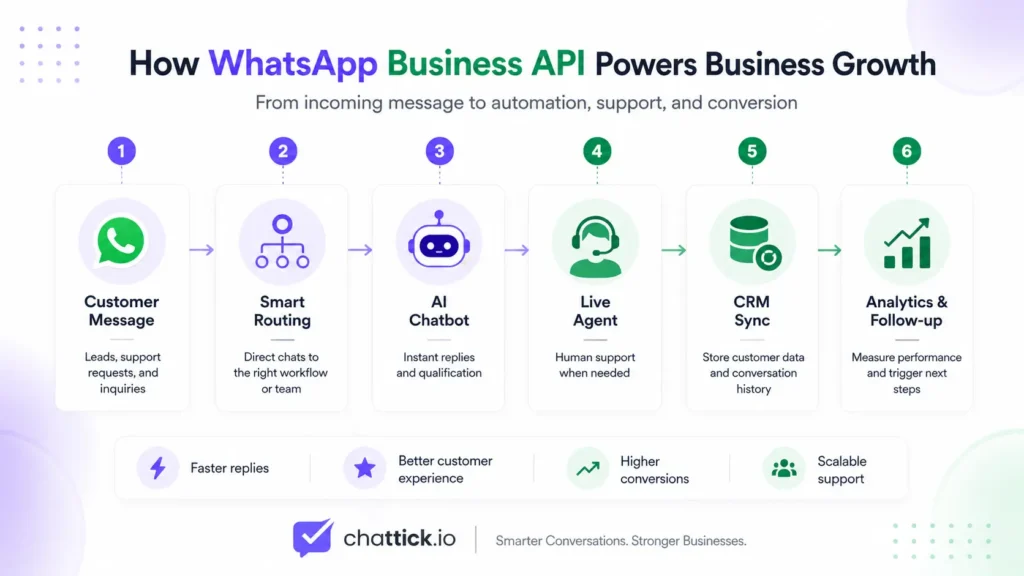
The API enables businesses to deliver a professional customer support experience through:
- Automated responses
- Smart routing
- Live agent handover
- AI assistance
- Ticket management
- Conversation history
- Service-level monitoring
This helps businesses respond faster while maintaining high service quality.
Comparison at a Glance
| Feature | WhatsApp Business App | WhatsApp Business API |
|---|---|---|
| Best For | Small businesses | Growing businesses & enterprises |
| Setup | Easy | Advanced |
| Cost | Free | Meta conversation charges + platform fees (if applicable) |
| Automation | Basic | Advanced AI automation |
| Chatbots | Not supported | Fully supported |
| Multi-Agent Access | Limited | Unlimited (platform dependent) |
| CRM Integration | No | Yes |
| Broadcast Messaging | Limited | Scalable |
| Analytics | Basic | Advanced |
| Integrations | Very limited | Extensive |
| Scalability | Low | High |
| Customer Support | Manual | Automated + Human Agents |
Which Solution Delivers Better Long-Term Value?
For businesses with a small customer base and minimal daily conversations, the WhatsApp Business App offers an easy and cost-effective way to manage customer communication.
However, once your business begins handling higher message volumes, requires multiple team members, or wants to automate customer engagement, the WhatsApp Business API becomes the more scalable and efficient solution.
The API is designed to support business growth by combining automation, integrations, analytics, and team collaboration into a single messaging ecosystem. It enables organizations to deliver faster responses, improve customer satisfaction, and manage conversations at scale without increasing manual workload.
8. Pricing Comparison
One of the biggest misconceptions about WhatsApp Business solutions is that both cost the same. While the WhatsApp Business App is free to use, the WhatsApp Business API follows a different pricing model designed for businesses that need advanced messaging capabilities.
Understanding the pricing difference helps you choose the right solution based on your business size, messaging volume, and automation needs.
WhatsApp Business App Pricing
The WhatsApp Business App is completely free to download and use.
You can:
- Create a business profile
- Send unlimited one-to-one messages
- Add a product catalog
- Use labels
- Set greeting and away messages
- Create quick replies
There are no monthly subscription fees or API charges.
However, businesses often face hidden costs as they grow, such as:
- Hiring additional support staff
- Spending more time on manual replies
- Losing leads due to delayed responses
- Managing customer data manually
Although the app itself is free, these operational costs can increase significantly over time.
WhatsApp Business API Pricing
The WhatsApp Business API is not free.
Pricing generally includes two components:
1. Meta Messaging Charges
Meta charges businesses based on the type of business messages they send. These may include:
- Marketing messages
- Utility messages
- Authentication messages
The exact pricing varies by country and message category. Businesses should always check the latest pricing available through Meta.
2. Platform or BSP Fees
If you use a WhatsApp Business Solution Provider (BSP), there may be additional charges for:
- API access
- Shared team inbox
- Automation tools
- Chatbots
- CRM integrations
- Analytics dashboards
- Campaign management
Some providers offer fixed monthly plans, while others charge based on usage or the number of users.
Which Option Offers Better Value?
If your business receives only a few customer inquiries each day, the free Business App is often enough.
However, businesses that depend on customer communication for sales or support usually recover the cost of the API through:
- Faster response times
- Increased sales conversions
- Better customer satisfaction
- Reduced manual workload
- Improved operational efficiency
For growing businesses, the API is often an investment rather than an expense.
9. Security and Verification
Customer trust is essential when communicating on WhatsApp. Both solutions provide secure messaging, but the level of business verification and security features differs.
WhatsApp Business App
The Business App includes:
- End-to-end encrypted conversations
- Business profile information
- Basic verification
While customers can view your business details, the app offers limited verification options for establishing brand credibility.
WhatsApp Business API
The API supports enterprise-grade security and business verification.
Businesses can benefit from:
- End-to-end encryption
- Verified WhatsApp Business Account (subject to Meta approval)
- Secure API authentication
- Controlled user permissions
- Compliance with enterprise security standards
- Audit logs through supported platforms
These features make the API suitable for organizations handling sensitive customer information.
10. Analytics and Reporting
Understanding customer interactions is essential for improving sales and support.
WhatsApp Business App
The Business App provides only basic insights, such as:
- Messages sent
- Messages delivered
- Messages read
- Messages received
While useful for small businesses, these metrics offer limited visibility into customer performance.
WhatsApp Business API
The API enables advanced reporting through supported platforms.
Businesses can track:
- Conversation volume
- Response times
- Agent productivity
- Campaign performance
- Customer satisfaction
- Conversion rates
- Delivery status
- Template performance
- Automation success rates
These insights help businesses optimize customer communication and make data-driven decisions.
11. Scalability
Your messaging solution should support your business as it grows.
WhatsApp Business App
The app works well for businesses with a low volume of customer conversations.
As your customer base grows, you may experience:
- Slower response times
- Limited team collaboration
- Manual workflows
- Increased operational workload
For businesses expanding rapidly, these limitations can affect customer experience.
WhatsApp Business API
The API is designed for scalability.
It can support:
- Thousands of daily conversations
- Multiple support teams
- Automated workflows
- AI-powered customer service
- CRM synchronization
- Global customer communication
Whether you’re managing 100 or 100,000 conversations, the API is built to grow with your business.
12. Real Business Examples
Choosing the right solution depends on your business model and daily communication needs.
Local Restaurant
A neighborhood restaurant receiving a limited number of orders each day can effectively manage customer communication using the WhatsApp Business App.
E-commerce Store
An online store benefits significantly from the WhatsApp Business API.
The API can automate:
- Order confirmations
- Shipping updates
- Cart reminders
- Payment notifications
- Customer support
Educational Consultancy
Education consultants often receive inquiries about admissions, visas, scholarships, and applications.
With the API, they can automate:
- Lead qualification
- Course recommendations
- Document reminders
- Appointment scheduling
- Follow-up campaigns
This improves response times while reducing manual effort.
Healthcare Clinic
Healthcare providers can use the API to automate:
- Appointment confirmations
- Reminder messages
- Prescription notifications
- Patient follow-ups
This helps reduce missed appointments and improves patient communication.
Real Estate Agency
Real estate businesses can automate:
- Property inquiries
- Lead distribution
- Viewing schedules
- Follow-up messages
- Customer nurturing campaigns
Sales teams can focus more on closing deals instead of manually managing repetitive conversations.
Business App or API? It Depends on Your Growth Stage
The WhatsApp Business App is an excellent starting point for small businesses that manage a limited number of customer conversations each day.
However, as customer inquiries increase and manual processes become difficult to manage, the WhatsApp Business API provides the automation, scalability, and integrations needed to support long-term business growth.
Businesses planning to expand should evaluate not only their current needs but also where they expect to be in the next one to three years. Choosing the right platform early can save time, improve customer experience, and create a stronger foundation for future growth.
13. Pros and Cons of WhatsApp Business App
The WhatsApp Business App is an excellent choice for businesses that are just getting started. It offers essential communication tools without requiring technical setup or monthly subscription costs. However, as your business grows, its limitations become more noticeable.
Pros
- Free to download and use
- Quick and simple setup
- Easy to manage for a single owner
- Business profile with contact information and business hours
- Product catalog support
- Quick replies, greeting messages, and away messages
- Labels to organize customer chats
- End-to-end encrypted messaging
Cons
- Limited automation capabilities
- Not designed for large customer support teams
- No native CRM integration
- Limited reporting and analytics
- No advanced chatbot support
- Manual conversation management
- Difficult to scale as message volume increases
For small businesses with fewer daily inquiries, these limitations may not be an issue. However, growing businesses often outgrow the app as customer communication becomes more complex.
14. Pros and Cons of WhatsApp Business API
The WhatsApp Business API is built for businesses that require automation, scalability, and professional customer communication. While it offers significantly more features, it also requires a more advanced setup.
Pros
- Supports AI-powered chatbots
- Advanced workflow automation
- Multiple agents can manage the same number
- CRM integration with popular platforms
- Scalable for businesses of all sizes
- Automated marketing, utility, and authentication messages
- Advanced analytics and reporting
- Integrates with e-commerce platforms and business tools
- Better customer experience through automation
- Suitable for enterprise-level communication
Cons
- Requires technical setup or a Business Solution Provider (BSP)
- Messaging costs may apply based on Meta’s pricing model
- Template approval is required for certain outbound messages
- More advanced than what very small businesses typically need
Although the API involves additional setup and operational costs, the long-term benefits often outweigh the investment for businesses focused on growth.
15. When Should You Upgrade to WhatsApp Business API?
Many businesses start with the WhatsApp Business App and later transition to the API as their communication needs evolve.
You should consider upgrading if your business experiences any of the following:
- You receive more customer inquiries than your team can handle manually.
- Multiple employees need access to the same WhatsApp number.
- You want to automate customer support using chatbots.
- You need to integrate WhatsApp with your CRM.
- You regularly send appointment reminders, order updates, or payment notifications.
- You want to run personalized marketing campaigns.
- You need detailed analytics to measure customer engagement.
- Your business is expanding to multiple locations or markets.
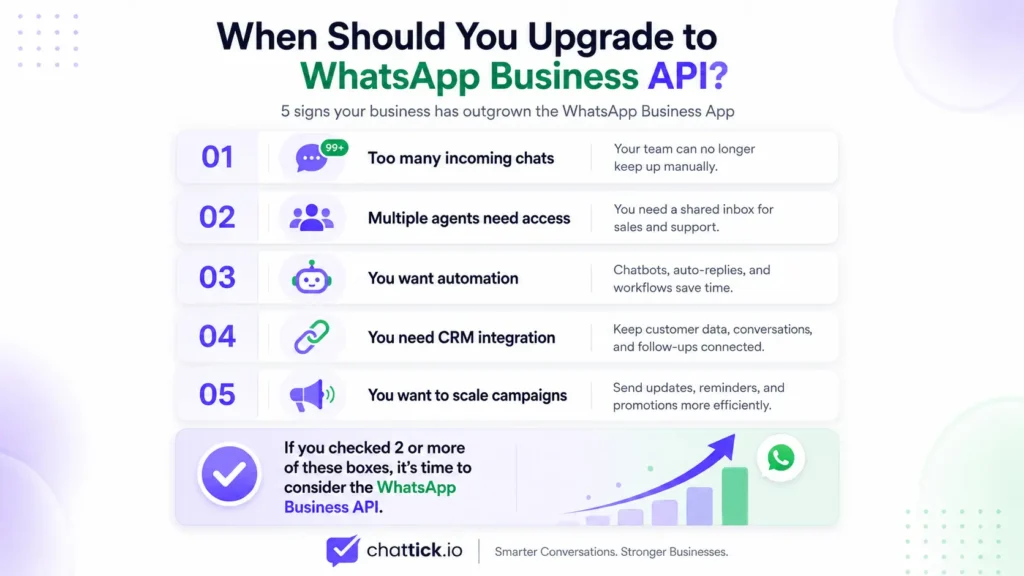
If several of these points apply to your business, the WhatsApp Business API is likely the better long-term solution.
16. Can You Use WhatsApp Business App and WhatsApp Business API Together?
Yes, in many cases businesses can use both solutions through WhatsApp Coexistence.
Coexistence allows eligible businesses to continue using the familiar WhatsApp Business App while also connecting the same number to the WhatsApp Business Platform.
This provides the flexibility to:
- Reply to customers manually through the Business App.
- Manage conversations from a shared team inbox.
- Automate repetitive customer interactions.
- Connect WhatsApp with CRM systems.
- Use AI chatbots without giving up the mobile app experience.
However, availability and supported features may vary depending on your WhatsApp Business Platform provider and Meta’s latest policies. Always verify compatibility before implementing coexistence.
17. Which One Should You Choose?
There is no one-size-fits-all answer. The right choice depends on your business size, daily message volume, and future growth plans.
Choose WhatsApp Business App if:
- You are a freelancer or solo entrepreneur.
- You own a local shop or restaurant.
- You receive a limited number of customer inquiries.
- You manually manage customer conversations.
- You do not require automation or CRM integration.
Choose WhatsApp Business API if:
- Your business is growing rapidly.
- You have multiple sales or support agents.
- You want to automate customer communication.
- You need chatbot support.
- You rely on CRM software.
- You send marketing or transactional messages at scale.
- You want to improve response times and customer experience.
For businesses planning long-term growth, the API provides the flexibility and scalability needed to support increasing customer demand.
Frequently Asked Questions (FAQs)
What is the main difference between WhatsApp Business App and WhatsApp Business API?
The WhatsApp Business App is designed for small businesses managing customer conversations manually, while the WhatsApp Business API is built for businesses that need automation, multiple users, CRM integrations, and scalable communication.
Is WhatsApp Business API free?
No. The API follows Meta’s messaging pricing model, and some Business Solution Providers may charge additional platform fees depending on the services they offer.
Can I switch from WhatsApp Business App to WhatsApp Business API?
Yes. Businesses can migrate their existing WhatsApp Business number to the WhatsApp Business Platform while retaining the same phone number, subject to Meta’s migration process and eligibility requirements.
Can multiple employees use the WhatsApp Business App?
The Business App supports companion devices, but it is not designed for large teams. Businesses that require shared inboxes and advanced collaboration should consider the WhatsApp Business API.
Does WhatsApp Business API support chatbots?
Yes. One of the biggest advantages of the API is its ability to integrate AI-powered chatbots and automated workflows, enabling businesses to handle customer inquiries efficiently.
Which option is better for e-commerce businesses?
For most e-commerce businesses, the WhatsApp Business API is the better choice because it supports order updates, abandoned cart reminders, customer support automation, and CRM integrations.
Can I keep my existing WhatsApp Business number?
Yes. In most cases, businesses can continue using their existing number when migrating to the WhatsApp Business Platform.
Conclusion
Both the WhatsApp Business App and WhatsApp Business API help businesses communicate with customers, but they are designed for different stages of growth.
If you operate a small business with a manageable number of daily conversations, the WhatsApp Business App offers an easy and cost-effective way to connect with customers.
However, if your business is expanding and requires automation, multiple team members, CRM integration, advanced analytics, and scalable messaging, the WhatsApp Business API is the better long-term investment.
Rather than choosing based only on your current needs, consider where your business will be in the next few years. Selecting the right platform today can improve efficiency, enhance customer experience, and support sustainable growth.
Need Help Choosing the Right WhatsApp Solution?
Whether you’re just starting with the WhatsApp Business App or you’re ready to upgrade to the WhatsApp Business API, Chattick can help.
Our team helps businesses:
- Set up WhatsApp Business API
- Configure WhatsApp Cloud API
- Build AI-powered chatbots
- Integrate WhatsApp with CRM systems
- Automate customer support and sales workflows
- Launch marketing and utility messaging campaigns
Ready to begin? Follow our complete guide on how to get WhatsApp Business API.
Ready to transform your customer communication? Contact the Chattick team today and discover how WhatsApp automation can help your business grow.