
A customer bought from your store six months ago. Another asked about a product that was out of stock. Someone else booked an appointment once and has not returned. You now have something useful to tell all three of them, but sending the same message one conversation at a time quickly becomes tedious once a customer list starts growing.
That is where a WhatsApp broadcast becomes useful. Instead of creating a group or manually copying the same message into dozens of chats, a business can send an update to multiple customers while keeping those conversations separate. From the customer’s side, it still feels like a private message from the business rather than an announcement dropped into a room full of strangers.
The idea itself is straightforward. The complication is that WhatsApp now offers more than one way for businesses to reach multiple customers. There is the traditional broadcast list most people already know, newer business broadcast features available to some WhatsApp Business users, and the WhatsApp Business Platform for companies that need messaging, templates, customer data and automation at a larger scale.
Those options are often mixed together in articles and videos, which is why you may see one guide saying the WhatsApp broadcast limit is 256 while another talks about campaigns reaching thousands of customers. Both can be discussing WhatsApp and still be talking about completely different setups.
What a WhatsApp Broadcast Actually Does
A broadcast is useful when several people need the same information but do not need to talk to each other.
Suppose a small furniture store finally receives a desk that several customers asked about during the previous month. The store could create a WhatsApp group and add everybody, but that would be awkward. Customers who only wanted a stock update would suddenly find themselves in a shared conversation with people they do not know.
A broadcast avoids that. The business sends the update to the relevant people, and each recipient receives it as an individual interaction. If one customer wants to buy the desk, their reply remains between them and the store. If another person ignores the message, there is no group conversation continuing around them.
That makes broadcasts useful for much more than promotions. Appointment availability, booking reminders, stock updates, event announcements, service changes, renewal notices and relevant follow-ups can all make sense when the audience has a genuine reason to receive them.
The mistake is thinking that because one message can go to many people, every message should.
The Traditional Broadcast List Is Still Useful
For a small business, the ordinary broadcast list may be enough.
WhatsApp currently allows up to 256 contacts in a traditional broadcast list, and WhatsApp also states that contacts on that list need to have the sender’s number saved in their address book.
That limitation sounds restrictive when it is viewed from the perspective of a large marketing database. In everyday business use, however, 256 contacts can cover quite a lot.
A barber with 70 regular clients does not need an enterprise messaging platform just to announce different opening hours during a holiday. A fitness coach may want to notify current clients that weekend sessions have opened. A small restaurant could maintain a list of customers who regularly ask about special menus.
If those customers already know the business, have the number saved and the replies are easy for one person to manage, there may be no reason to complicate the process.
Problems usually appear later. The business now has five lists instead of one. One customer appears on two of them. Somebody has to remember which list received last week’s promotion. Different services need different audiences, and several staff members are involved in answering replies.
The feature itself has not suddenly become bad. The business has simply outgrown the way it was being used.
Business Broadcasts Are Not the Same as an Ordinary List
This distinction is important because searching for “WhatsApp broadcast” can now bring up information about more than the traditional list feature.
WhatsApp has a separate Business Broadcasts experience for eligible WhatsApp Business users. WhatsApp’s current Help Center also has dedicated guidance for creating these business broadcasts and states that the feature may not be available to every account.
Business Broadcasts can also involve charges. WhatsApp’s current pricing guidance says these broadcasts can be sent for a fee and that pricing is based on the recipient’s country code.
That is quite different from the old mental model of a broadcast list being little more than a saved list of contacts inside the app.
For a business, the practical lesson is simple: check what is actually available in your own WhatsApp Business account before building a campaign around something you saw in a tutorial. Features can differ by account and market, and a video recorded months ago may not show the same options you have today.
Why the 256-Contact Limit Causes So Much Confusion
The phrase “WhatsApp broadcast limit” is commonly followed by the number 256, and that is correct for a traditional broadcast list. The confusion starts when that number is presented as though it applies to every form of business messaging on WhatsApp.
It does not.
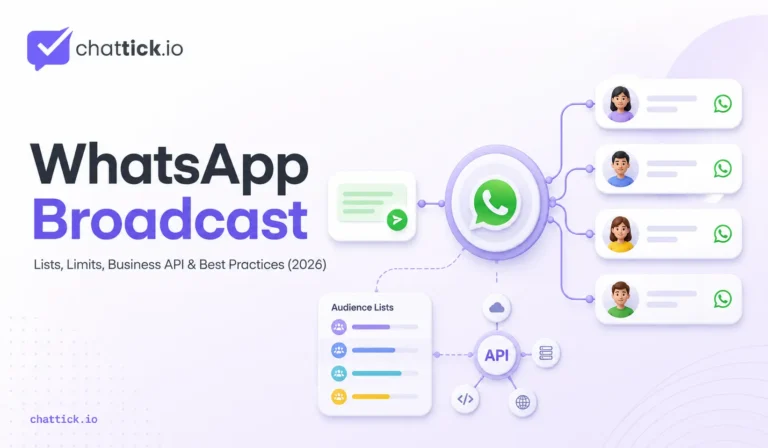
A traditional list and the WhatsApp Business Platform solve different problems. The traditional list is convenient for relatively small audiences that can be managed inside the app. The Business Platform is intended for businesses that need customer messaging to work with templates, integrations, automation and other systems at scale. WhatsApp describes the Platform as business messaging built to scale and supports both customer-initiated conversations and business-initiated messaging.
Instead of asking only how to get around the 256-person limit, it is more useful to ask why the business needs to get around it.
If you have 300 loyal customers and occasionally need to send them a useful update, the problem is quite small. If you have 30,000 customer records, different campaigns for different customer groups, several sales agents and automated follow-ups, increasing the size of a list does not solve the real problem.
You need a different way of managing the communication.
How WhatsApp Business Platform Messaging Fits In
People often refer to “API broadcasts,” although the WhatsApp Business Platform does not simply give you one giant version of the broadcast-list button.
For business-initiated messages, WhatsApp says a company must first obtain the customer’s opt-in. Those messages are then created using customizable message templates, which can be text-based, media-based or interactive.
That changes what is possible behind the message.
Imagine a company sells home internet packages in several cities. Instead of somebody manually creating a contact list, the business could use customer data to identify people in one service area who previously asked about a package but never completed their order.
Another company might want to contact customers whose subscription is approaching renewal. A retailer could reach people who previously bought from one particular product category. A clinic might send relevant communication according to an appointment or customer record rather than relying on somebody maintaining lists by hand.
The WhatsApp message the customer receives may still be only two or three sentences. The sophistication is happening behind the scenes.
That is the real advantage of the Platform. It is not simply about sending a larger quantity of messages. It is about connecting messaging with the way the business already manages customers.
A Phone Number Is Not Automatically a Marketing Audience
This is worth getting right early.
Businesses collect phone numbers everywhere: checkout forms, lead forms, quotations, support conversations, bookings and old customer records. It is easy to look at that database and think, “We already have thousands of WhatsApp contacts.”
Technically having somebody’s number and having a good reason to message them are very different things.
WhatsApp requires businesses using the Platform to obtain opt-in before initiating messages. Its 2026 marketing guidance also emphasises that people should expect the messages they receive, and businesses need to clearly identify the business the person is agreeing to hear from.
This is not merely a box to tick before sending.
Expectation has a huge effect on how a message feels. If you asked a clothing store to tell you when a jacket returns to stock and you receive that update two weeks later, the message is helpful. If another company you vaguely remember from three years ago suddenly starts sending weekly promotions, the experience is completely different.
A smaller audience that expects your messages is usually worth more than an enormous contact database that does not.
Do Not Use WhatsApp Like a Cheap Email List
Once a business gets a decent response from its first few broadcasts, sending more becomes tempting.
A monthly product update turns into a weekly promotion. Then another campaign goes out because sales were slow on Tuesday. Soon every discount, new blog post, service announcement and minor company update is considered worthy of a WhatsApp message.
That usually ends badly.
WhatsApp sits closer to a personal conversation than a traditional email newsletter. People use the same app to speak with family, customers, colleagues, schools, delivery drivers and friends. A promotional email disappearing among dozens of other emails is one thing. Repeatedly interrupting somebody’s messaging inbox with irrelevant offers is another.
WhatsApp itself supports marketing messages for purposes such as awareness, sales, product recommendations, targeted offers and re-engagement. The point is not that marketing is inappropriate on WhatsApp. The point is that the message needs to earn its place there.
A useful question before sending is: Would the customer understand why they received this?
If the answer is obvious, you probably have a reasonable campaign. If the answer is simply “because their number is in our CRM,” reconsider it.
Good Segmentation Is More Valuable Than a Bigger List
Imagine an online furniture retailer has 12,000 customer contacts and wants to promote a new range of office chairs.
Sending the announcement to all 12,000 is certainly easy.
It is not necessarily smart.
Some customers bought children’s furniture. Others only purchased garden products. A smaller group has bought desks, office storage or previous office-chair models. Another group looked at office furniture recently but did not purchase.
The last two groups have a much stronger reason to care.
This is where a WhatsApp broadcast becomes more useful when it is tied to customer context rather than raw list size. The campaign might reach only 2,000 people instead of 12,000, yet those 2,000 are closer to the subject of the message.
Segmentation does not need to become ridiculously complicated either. A small business may only need to separate current customers from leads. Another might divide contacts by service interest or location.
The purpose is not to create twenty-seven marketing segments because a CRM allows it.
The purpose is to avoid sending obvious nonsense to customers.
The Message Should Have One Reason for Existing
One of the easiest ways to ruin a broadcast is to try to make the message do everything.
A customer opens WhatsApp and finds a company announcing a new product, mentioning a weekend discount, promoting a loyalty scheme, requesting a review and reminding them that opening hours have changed.
There may be five useful pieces of information in there, but together they become noise.
The strongest broadcasts are usually much easier to explain. “The product you asked about is back in stock.” “We have two appointment slots open on Friday.” “Your subscription renews next week.” “Bookings for September are now available.”
The customer understands immediately why the message arrived.
That also makes the call to action more natural. If the message is about an appointment, help them book it. If it is about a product, let them view or order it. If no action is required, do not invent one just because marketing software has a button field.
One message does not need to carry the entire marketing plan.
Write for the Person Reading the Chat
There is a strange change in tone that happens when businesses start writing “campaign copy.”
Normal language disappears.
A company that would happily say, “We have a few spaces available this Saturday,” suddenly writes something like, “LIMITED AVAILABILITY! DON’T MISS YOUR CHANCE TO SECURE YOUR SLOT TODAY!”
The second version may suit some brands and promotions, but it often feels out of place in a one-to-one WhatsApp conversation.
Remember what the recipient sees. They do not see your campaign dashboard, audience count, automation workflow or marketing calendar. They see a message inside a chat.
That means conversational writing generally fits better.
A retailer could write, “The trainers you asked about are back in stock. We received the new shipment this morning, so I thought I’d let you know.”
A clinic might say, “A few consultation times opened up for Thursday afternoon. If you were still looking for an appointment, you can choose one here.”
Neither example is complicated. Both sound like something a business might reasonably tell an actual customer.
That is a better standard than trying to make every broadcast sound like an advertisement.
Timing Depends on the Message, Not a Magic Hour
There is no single “best time” for every WhatsApp campaign.
A restaurant advertising lunch does not have the same timing problem as a software company reminding customers about subscription renewal. An appointment reminder has a natural deadline. A back-in-stock notification is relevant because the stock has just returned.
Context should come first.
If the customer asked to be told when something became available, telling them shortly after it becomes available makes sense. If bookings for an event open Monday morning, there is a reason the message is arriving on Monday. If a promotion ends on Friday, telling somebody three weeks later obviously does not work.
WhatsApp’s own 2026 guidance describes high-quality marketing messages as expected, timely and relevant, and recommends using clearly defined campaign goals and reviewing performance over time.
That is more useful than blindly following a blog post claiming every business should broadcast at 10:17 on Tuesday morning.
Start with why the customer needs the message. Then work backwards to when it should arrive.
Frequency Is Where Good Channels Get Ruined
A message can be relevant and still become annoying when it is repeated too often.
There is no universal number of broadcasts that every company should send per week or month. A delivery service may have a reason to communicate regularly because customers are actively expecting order updates. A property agency sending promotional listings to old prospects may need to be much more selective.
Look at the relationship rather than the calendar.
If customers frequently reply, click, book or otherwise engage with broadcasts, that tells you something. If more people begin ignoring messages, blocking the business or opting out, that tells you something too.
WhatsApp’s current marketing guidance explicitly notes that people can block businesses or stop receiving marketing messages and that quality signals can affect a business’s ability to reach customers.
That is a good reason to care about message quality before volume becomes a problem.
The objective should not be finding the maximum number of broadcasts customers will tolerate.
It should be preserving the value of the channel.
Sending the Broadcast Is Only Half the Work
Suppose a business sends a well-targeted campaign to 4,000 people.
It works.
One hundred and eighty customers reply during the next two hours.
Who is answering them?
This part is surprisingly easy to forget because so much attention goes into preparing the outbound message. A successful campaign does not end when the delivery number goes up. It creates inbound conversations, and those conversations now need somewhere to go.
For a small list, one person may be perfectly capable of handling everything. As volume increases, the business may need clearer ownership.
A pricing enquiry should probably reach sales. An existing customer reporting a problem needs support. A booking request may need access to an appointment system. Some simple questions may be handled through automation, while others should reach a person immediately.
If customers receive a polished promotion and then wait most of the day for somebody to answer, the campaign has created interest without creating a good experience.
Before sending a large broadcast, plan what happens when it succeeds.
This Is Where a Shared Inbox Starts to Matter
Traditional WhatsApp use is easy to understand when one person owns the phone.
The same setup becomes less comfortable when five people are involved.
Who answered this lead? Did someone already send the price? Why is support handling a sales enquiry? Did anyone follow up with the customer who replied yesterday afternoon?
A shared inbox is useful because it solves an ownership problem rather than a messaging problem. Everyone can see which conversations are open, who is responsible and where attention is still required.
The customer does not care how that system works internally. They should simply feel that the company knows what is happening.
A business running regular broadcasts should think about this earlier rather than later. The larger the audience becomes, the more likely one successful campaign is to create a sudden rush of conversations.
CRM Integration Changes Who Gets the Message
The real value of connecting WhatsApp with a CRM is not that the CRM makes messages look more impressive.
It gives the business better context.
Without customer data, an audience may be “everyone who gave us a phone number.” With useful CRM information, it could become “customers who requested Service A during the last 90 days but never booked.”
That is a very different broadcast.
A subscription business could identify customers approaching renewal. A recruitment company might contact candidates in one field rather than its entire database. A clinic could separate new enquiries from existing patients. A retailer could work from purchase history or product interest.
The message itself may remain short.
The intelligence is in deciding who receives it.
This also helps when the customer replies. The agent may be able to see previous conversations, lead status, service interest or other relevant context instead of treating each incoming WhatsApp message as though the company has never spoken to the person before.
Automation Is Most Useful Behind the Conversation
“WhatsApp automation” often gets reduced to chatbots.
That is too narrow.
Some of the best automation is almost invisible to the customer.
A customer replies to a campaign about consultations, and the conversation is assigned to the correct team. Someone completes a purchase and is automatically removed from an unnecessary follow-up sequence. A new enquiry creates a CRM record. An appointment booking updates the customer record without an employee copying the details manually.
None of that requires pretending a bot is a human being.
It simply removes repetitive administration from the process.
This is where a platform such as Chattick becomes useful for businesses that are moving beyond manual WhatsApp management. Conversations, customer context, team ownership and follow-up can work together instead of being scattered across separate tools.
Automation should make the business more reliable.
It should not make the customer work harder to reach somebody.
WhatsApp Broadcast Pricing Changes the Calculation
For businesses using the WhatsApp Business Platform, outbound messaging needs to be treated as a real campaign cost.
WhatsApp currently charges Platform businesses on a per-delivered-message basis, not simply when a message is sent. Rates depend on the recipient market and message category. The Platform currently uses four categories: marketing, utility, authentication and service.
That makes poor targeting expensive in two ways.
First, the business is spending money on messages that may not produce anything useful. Second, it is using customer attention on communication those people did not particularly need.
A larger audience can therefore make a campaign worse rather than better.
If 8,000 customers are genuinely relevant, send to 8,000. If only 1,500 have a sensible reason to receive the promotion, sending to the other 6,500 does not improve the campaign simply because the final number looks more impressive.
Good targeting becomes part of cost control.
What Should You Actually Measure?
The number of messages sent is not a useful success metric by itself.
If the business sent 20,000 messages, that tells you the size of the activity. It does not tell you whether anything good happened.
Start with the reason for the campaign.
For appointment broadcasts, bookings probably matter. For a product launch, you may care about product views, replies or purchases. A re-engagement campaign may be judged on whether dormant customers begin conversations again.
For some broadcasts, a reply is the goal. For others, customers may complete an action without ever replying.
That means reporting should follow the business outcome rather than whatever metric looks most impressive in a dashboard.
A campaign that sends fewer messages and creates more qualified conversations is often doing a better job than one that reaches a huge audience and produces very little.
When the Business App Is Enough
There is no prize for moving to the API before you need it.
If a business has a manageable customer list, one or two people handle WhatsApp, broadcasts are occasional and nobody is getting lost in the inbox, the Business app may continue to work perfectly well.
Keep it.
Software should solve problems, not manufacture them.
The need for something more usually becomes obvious through friction. Lists become difficult to maintain. Customer information lives somewhere else. Several staff members need access. Different groups need different messages. Follow-ups are being forgotten. Campaign replies are difficult to assign.
Those are meaningful signs.
Once those problems are happening regularly, moving towards a more structured WhatsApp setup begins to make sense.
When the WhatsApp Business Platform Makes More Sense
The Platform becomes more relevant when WhatsApp is no longer just a messaging app the business happens to use.
It has become part of sales, support, bookings, retention or marketing.
The company may need several agents, CRM data, message templates, campaign segmentation, automated workflows or reporting that connects conversations with actual business results.
At that point, trying to recreate everything with more manual broadcast lists becomes frustrating.
A growing company should not choose the Platform merely because its customer database has passed 256 people. The better question is whether the business processes around WhatsApp have outgrown manual management.
Those two moments do not always happen at the same time.
Common WhatsApp Broadcast Mistakes
Sending too much is the obvious one, but it is not the only one.
Poor segmentation is equally common. A company has one database and assumes every person in it should receive every campaign. That may be easy administratively, but it is rarely good communication.
Writing every message like an advertisement is another problem. WhatsApp is still a chat environment. Customers usually respond better to something that sounds appropriate in a conversation.
Businesses also spend too much time thinking about the outgoing message and not enough time thinking about the reply. If a campaign is expected to create conversations, somebody needs to own those conversations.
Finally, businesses should avoid confusing technical reach with permission. Being capable of sending a message is not the same as having a good reason to send it.
Most bad broadcast campaigns are not caused by WhatsApp.
They are caused by poor decisions around audience, timing and relevance.
WhatsApp Broadcast Best Practices for 2026
The most useful WhatsApp broadcast best practices are fairly ordinary.
Send the message to people who have a reason to care. Make the purpose obvious. Do not squeeze several unrelated offers into one chat. Write in a way that feels natural for WhatsApp rather than copying text directly from an advertising banner.
Give the customer an obvious next step where one is needed. Think about timing in relation to the actual message rather than chasing a universal “best send time.” Make sure somebody can handle replies.
For larger campaigns, use customer data to improve relevance and measure what happens after delivery. If broadcasts are now important to the business, build a process that can support them instead of continuing to rely on memory and manually managed lists.
None of these ideas is particularly clever.
That is probably why they work.
Frequently Asked Questions
What Is a WhatsApp Broadcast?
A WhatsApp broadcast lets a sender distribute the same message to multiple contacts while keeping the recipient conversations separate. It differs from a WhatsApp group because recipients are not placed into one shared discussion.
What Is the WhatsApp Broadcast Limit?
A traditional WhatsApp broadcast list currently supports up to 256 contacts per list. WhatsApp also says those contacts need to have the sender’s number saved in their address book.
Can I Create More Than One Broadcast List?
Businesses can use more than one traditional list, but creating several lists does not provide the same capabilities as a dedicated business messaging setup. Once segmentation, multiple agents, CRM data or automation become important, manually managing several lists can become difficult.
Are Business Broadcasts the Same as Traditional Broadcast Lists?
No. WhatsApp has separate guidance for Business Broadcasts, and their availability can depend on account eligibility. WhatsApp also states that business broadcasts can involve fees.
Can I Send WhatsApp Broadcasts Through the API?
The WhatsApp Business Platform handles business-initiated communication differently from a traditional broadcast list. Businesses can initiate messages after obtaining customer opt-in, using customizable message templates.
Do I Need Customer Opt-In?
For business-initiated Platform messaging, yes. WhatsApp states that businesses need to secure customer opt-in before initiating those messages.
Is WhatsApp Broadcast Free?
Traditional app features and newer commercial business broadcasting should not be treated as the same thing. WhatsApp currently says Business Broadcasts can be charged, with pricing based on the recipient’s country code. Business Platform pricing also operates separately on a per-delivered-message basis.
Is a Broadcast Better Than a WhatsApp Group?
It depends on what you are trying to do. Groups make sense when members should interact with one another. Broadcasts are generally better when a business wants to communicate with several customers while keeping each customer relationship private.
What Can I Send in a WhatsApp Broadcast?
Useful examples include stock notifications, appointment availability, booking updates, relevant promotions, renewal reminders, product announcements and customer re-engagement. For Platform marketing messages, WhatsApp officially supports uses such as product recommendations, targeted offers, price drops, abandoned-cart recovery and re-engagement.
Final Thoughts
A WhatsApp broadcast is easy to understand when the audience is small. You have something useful to tell several customers, you send the message, and you handle any replies.
The harder questions arrive as the business grows.
Now you need to decide which customers should receive each message. You need to know whether they expected to hear from you. Somebody has to manage replies. Customer history may need to come from a CRM, and successful campaigns may create enough conversations that one person can no longer keep track of everything.
At that point, the broadcast itself is no longer the interesting part.
The process around it is.
Traditional lists are still perfectly useful when they fit the job. The WhatsApp Business Platform makes more sense when messaging needs to connect with larger customer databases, templates, teams and business workflows. Neither option is automatically better simply because it is more advanced.
Use the simplest setup that reliably handles the work.
And when planning the next campaign, do not begin by asking how many people you can message.
Ask which customers would actually be glad to receive it.