
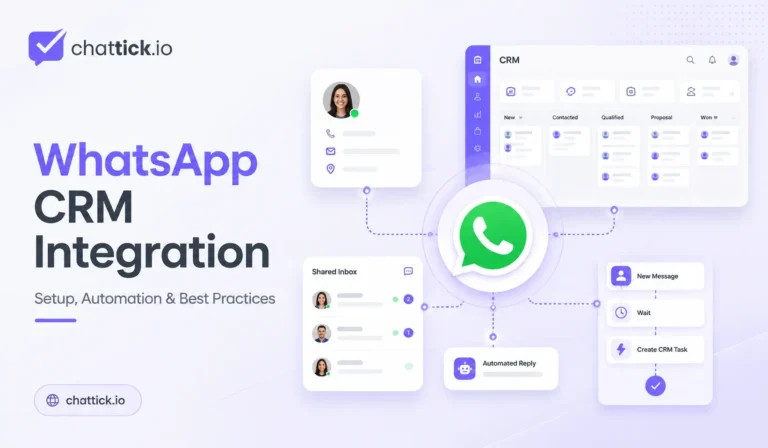

WhatsApp CRM integration connects customer conversations on WhatsApp with your CRM system so sales, support, and service teams can manage leads and customer information from one connected workflow.
Instead of keeping important customer information inside individual WhatsApp conversations, the integration can automatically create contacts, update CRM fields, assign team members, create sales opportunities, record conversation activity, trigger follow-ups, and send relevant WhatsApp messages.
A well-planned WhatsApp CRM integration can help businesses:
- Capture WhatsApp leads automatically
- Create and update CRM contacts
- Assign conversations to sales or support agents
- Store customer information in one place
- Update pipeline stages
- Trigger automated follow-ups
- Send appointment and order notifications
- Track conversation activity
- Reduce manual data entry
- Improve response times
- Prevent leads from being forgotten
- Build more consistent customer journeys
This guide explains how WhatsApp CRM integration works, what you need before setup, which customer data should be synchronized, how CRM automation works, common use cases, implementation methods, security considerations, costs, mistakes to avoid, and best practices for 2026.
Quick Answer: What Is WhatsApp CRM Integration?
WhatsApp CRM integration is the connection between WhatsApp Business Platform and a customer relationship management system.
It allows information to move automatically between WhatsApp and the CRM.
For example:
Customer Sends WhatsApp Message
→ Webhook Receives Message
→ CRM Searches Customer
→ Contact Created or Updated
→ Lead Assigned to Salesperson
→ Conversation Stored
→ Follow-Up Workflow Started
The integration can work in both directions.
Information coming from WhatsApp can update the CRM, while CRM events can trigger approved WhatsApp messages.
For example:
CRM Opportunity Moves to Appointment Booked
→ Automation Starts
→ WhatsApp Confirmation Sent
→ Reminder Scheduled
→ Conversation Activity Updated
This makes WhatsApp part of the complete sales and customer-service process rather than a separate communication channel.
Why WhatsApp CRM Integration Matters
Businesses often receive valuable customer inquiries through WhatsApp.
Without CRM integration, employees may need to manually:
- Copy phone numbers
- Create customer records
- Add notes
- Update pipeline stages
- Remember follow-ups
- Send confirmation messages
- Inform other team members
- Track conversation results
This becomes difficult as message volume increases.
WhatsApp CRM integration reduces this manual work by connecting customer conversations directly with business data.
Better Lead Management
A new WhatsApp inquiry can automatically become a CRM lead.
The system can store:
- Customer name
- Phone number
- Lead source
- Service interest
- Location
- Preferred language
- Campaign
- Assigned agent
- Conversation date
- Qualification status
This helps sales teams respond without manually entering every lead.
Faster Customer Response
The CRM can identify whether a customer is:
- A new lead
- Existing customer
- Active opportunity
- Previous buyer
- Support customer
- Appointment holder
The system can then route the conversation accordingly.
Centralized Customer History
A connected CRM can provide agents with access to previous:
- Conversations
- Appointments
- Purchases
- Support tickets
- Follow-ups
- Pipeline stages
- Internal notes
Agents do not need to ask customers for the same information repeatedly.
More Reliable Follow-Ups
CRM automation can trigger follow-ups based on customer status.
For example:
New Lead
→ No Reply for 2 Hours
→ Create Follow-Up Task
→ Notify Assigned Agent
Or:
Consultation Completed
→ Wait 1 Day
→ Send Approved Follow-Up
→ Update CRM Activity
How Does WhatsApp CRM Integration Work?
A complete WhatsApp CRM integration normally includes several connected components.
WhatsApp Business Platform
WhatsApp Business Platform provides the messaging connection.
Businesses commonly use WhatsApp Cloud API to:
- Send messages
- Receive messages
- Send approved templates
- Track message statuses
- Receive interactive replies
WhatsApp Business Account
The WhatsApp Business Account, or WABA, contains important WhatsApp assets such as:
- Business phone numbers
- Message templates
- Business profile
- Messaging configuration
- Connected applications
Business Phone Number
The business phone number is the number customers use to communicate with the company.
The integration associates WhatsApp messages with the correct customer record using phone-number information.
Phone numbers should be normalized before CRM matching.
For example:
+1 555 123 4567should not be stored separately from:
15551234567if both represent the same customer.
CRM System
The CRM stores customer and business information.
Typical CRM objects include:
- Contacts
- Companies
- Deals
- Opportunities
- Pipelines
- Tasks
- Notes
- Appointments
- Activities
- Tags
Webhooks
Webhooks deliver incoming WhatsApp events to the connected system.
When a customer sends a message, the webhook can trigger the CRM integration immediately.
Example:
Incoming WhatsApp Message
→ Webhook
→ Customer Search
→ CRM Update
→ Automation
→ Agent Assignment
API or Middleware
The integration layer connects WhatsApp with the CRM.
It may be:
- Custom backend code
- Integration middleware
- Automation platform
- Managed WhatsApp platform
- CRM-native connector
The correct method depends on business requirements and technical resources.
What Data Should WhatsApp Send to the CRM?
Good data mapping is one of the most important parts of WhatsApp CRM integration.
Do not create dozens of unnecessary fields.
Store information that your sales or support team will actually use.
Core Contact Fields
Recommended basic fields include:
- Full name
- WhatsApp phone number
- Company
- Location
- Language
- Lead source
- Contact owner
WhatsApp-Specific Fields
Useful WhatsApp fields may include:
- WhatsApp opt-in status
- WhatsApp opt-in date
- Last WhatsApp message
- Last message date
- Conversation status
- Assigned WhatsApp agent
- WhatsApp Phone Number ID
- WABA ID
- Last template sent
- Last message status
Sales Fields
For sales workflows, consider storing:
- Service interest
- Budget range
- Lead status
- Lead score
- Pipeline stage
- Opportunity value
- Preferred appointment date
- Next follow-up date
- Sales representative
Customer-Service Fields
Support teams may need:
- Customer ID
- Ticket ID
- Issue category
- Priority
- Current status
- Assigned support agent
- Last support interaction
- Resolution status
E-Commerce Fields
An online store may synchronize:
- Order number
- Order status
- Payment status
- Product
- Delivery status
- Tracking number
- Customer value
- Last purchase date
The CRM should remain organized enough for employees to understand the customer record quickly.
WhatsApp Contact Matching
Before creating a new contact, the integration should search the CRM.
A good workflow is:
Incoming WhatsApp Message
→ Normalize Phone Number
→ Search CRM
→ Contact Found?
   → Yes: Update Existing Contact
   → No: Create New Contact
This prevents duplicate CRM records.
Phone Number Normalization
Store phone numbers using a consistent international format.
For example:
Country Code + Subscriber NumberAvoid creating separate contacts because one record contains spaces, another contains brackets, and another contains a local number format.
Email Matching
If email is available, it can provide an additional matching signal.
However, WhatsApp conversations should generally use the phone number as the primary communication identifier.
New Lead Capture through WhatsApp
One of the most valuable WhatsApp CRM integration use cases is automatic lead capture.
A basic flow may look like:
New WhatsApp Inquiry
→ Check CRM Contact
→ Create New Contact
→ Add Lead Source = WhatsApp
→ Create Opportunity
→ Assign Salesperson
→ Send Welcome Reply
→ Create Follow-Up Task
The CRM may also store:
- Which campaign generated the inquiry
- Which website page was visited
- Which service the customer selected
- Which advertisement started the conversation
This gives sales teams better attribution data.
CRM Pipeline Integration
WhatsApp conversations can update sales pipelines.
Example stages:
New Lead
→ Contacted
→ Qualified
→ Appointment Booked
→ Proposal Sent
→ Won
→ Lost
Customer actions can automatically move opportunities between stages.
For example:
Customer Books Appointment
→ Update Pipeline to Appointment Booked
Or:
Payment Confirmed
→ Update Opportunity to Won
Avoid moving pipeline stages based only on uncertain chatbot assumptions.
Important sales actions should use clear customer or business events.
WhatsApp CRM Automation
Automation allows businesses to act when CRM data changes.
New Lead Automation
WhatsApp Inquiry Received
→ Create Contact
→ Create Opportunity
→ Assign Agent
→ Send Initial Reply
→ Notify Sales Team
Lead Qualification Automation
A chatbot can ask structured questions such as:
- What service are you interested in?
- What is your location?
- When do you need the service?
- What is your estimated budget?
- Would you like to book a consultation?
The answers can update CRM fields.
Example:
Customer Answers Questions
→ Update Service Interest
→ Update Location
→ Update Lead Score
→ Assign Correct Salesperson
Follow-Up Automation
If the customer does not respond:
No Customer Reply
→ Wait
→ Create Agent Task
→ Send Relevant Approved Follow-Up if Allowed
Do not send repeated messages simply because an automation is available.
Follow-ups should remain relevant and respect customer consent.
Appointment Automation
When a booking is created:
Appointment Booked
→ Update CRM
→ Send WhatsApp Confirmation
→ Schedule Reminder
→ Notify Assigned Agent
→ Update Pipeline Stage
If the customer reschedules:
Appointment Rescheduled
→ Update Calendar
→ Update CRM
→ Send New Confirmation
If the customer cancels:
Appointment Cancelled
→ Update CRM
→ Cancel Reminder Workflow
→ Notify Agent
Sales Assignment Automation
Leads can be assigned based on:
- Location
- Service type
- Language
- Agent availability
- Territory
- Lead value
- Existing account owner
Example:
New Real Estate Lead
→ Location = Dubai
→ Assign Dubai Sales Team
Human Agent Handover
Automation should not prevent customers from reaching human support.
A chatbot may detect:
Talk to agent
Speak with someone
Human support
Need help
Then:
Customer Requests Agent
→ Stop Chatbot
→ Assign Conversation
→ Notify Agent
→ Update CRM Owner
The CRM should clearly show when a conversation is waiting for human attention.
Shared Inbox and CRM Integration
A shared WhatsApp inbox allows multiple agents to communicate through one business number.
CRM integration makes the inbox more useful by showing customer data alongside the conversation.
An agent may see:
- Customer name
- Company
- Lead status
- Previous conversations
- Opportunity stage
- Appointment information
- Orders
- Tags
- Notes
- Assigned salesperson
This reduces switching between multiple applications.
Conversation Assignment
Incoming conversations can be assigned automatically.
Possible routing rules include:
- Round-robin
- Department
- Customer language
- Location
- Existing CRM owner
- Service interest
- Priority
If an existing contact already has a salesperson, new WhatsApp conversations can automatically return to that employee.
Internal Notes
Agents should be able to leave internal notes that are not sent to the customer.
Examples:
Customer requested revised proposal.Follow up after Friday.Waiting for finance team approval.Important notes can also be synchronized with the CRM.
WhatsApp CRM Integration for Sales Teams
Sales teams can use WhatsApp CRM integration throughout the customer journey.
Lead Capture
Automatically create leads from WhatsApp conversations.
Lead Qualification
Use automated questions or agent responses to update qualification fields.
Appointment Booking
Connect qualified leads with a calendar.
Proposal Follow-Up
Notify sales representatives when prospects respond.
Pipeline Management
Automatically update opportunity stages based on customer actions.
Customer Reactivation
Use permission-based messaging to reconnect with eligible contacts.
Sales Reporting
Track:
- WhatsApp leads
- Qualified leads
- Appointments
- Conversions
- Closed opportunities
- Revenue attribution
This helps businesses understand whether WhatsApp is generating actual business results rather than only conversation volume.
WhatsApp CRM Integration for Customer Support
Customer-support teams can connect WhatsApp with service records.
Example:
Customer Sends Support Message
→ CRM Finds Customer
→ Existing Ticket Search
→ Ticket Created if Needed
→ Assign Support Agent
→ Send Confirmation
Support workflows can store:
- Issue type
- Ticket priority
- Customer history
- Assigned agent
- Resolution time
- Satisfaction result
Returning Customer Identification
When an existing customer sends a message, the CRM can immediately display:
- Name
- Customer ID
- Products
- Previous tickets
- Account status
This helps agents provide more informed support.
WhatsApp CRM Integration for Appointment Businesses
Businesses that rely on bookings can connect WhatsApp, CRM, and calendars.
Examples include:
- Clinics
- Agencies
- Consultants
- Salons
- Education advisers
- Real estate teams
- Professional services
A complete workflow may be:
Lead Arrives
→ CRM Contact Created
→ Appointment Link Sent
→ Appointment Booked
→ CRM Updated
→ Confirmation Sent
→ Reminder Sent
→ Meeting Completed
→ Follow-Up Started
This reduces repetitive administrative work.
WhatsApp CRM Integration for E-Commerce
Online stores can connect WhatsApp with CRM and order systems.
Common workflows include:
- Order confirmation
- Payment confirmation
- Shipping updates
- Delivery notifications
- Customer support
- Abandoned-cart follow-up
- Product questions
- Returns
- Feedback requests
Example:
Order Created
→ Customer Matched in CRM
→ Order Added to Customer Record
→ Confirmation Sent
→ Shipping Event Occurs
→ WhatsApp Update Sent
When the customer later contacts support, agents can see the existing order information.
WhatsApp CRM Integration Methods
Businesses have several ways to create the connection.
Direct API Integration
A development team connects WhatsApp Cloud API directly with the CRM.
Advantages
- Maximum customization
- Custom business logic
- Full control over data mapping
- Flexible automation
- Ability to connect internal systems
Limitations
- Development required
- Webhooks must be maintained
- Security must be managed
- Error monitoring required
- API changes need maintenance
Direct integration is suitable for businesses with unique or complex requirements.
Native CRM Integration
Some CRM platforms or connected providers offer prebuilt WhatsApp connections.
Advantages
- Faster implementation
- Less coding
- Familiar CRM interface
- Easier maintenance
Limitations
- Available features vary
- Customization may be limited
- Additional subscription costs may apply
- Automation options depend on the provider
Managed WhatsApp Platform
A managed platform can provide:
- WhatsApp connection
- Shared inbox
- Agent management
- CRM synchronization
- Automation
- Templates
- Analytics
This can reduce development requirements.
Automation Middleware
Workflow platforms or middleware can connect WhatsApp events with CRM actions.
Example:
WhatsApp Webhook
→ Middleware
→ CRM Contact Search
→ Update Contact
→ Create Opportunity
→ Send Response
This can work well for simple or medium-complexity workflows.
Complete WhatsApp CRM Integration Setup Process
Step 1: Define Your Business Goal
Before connecting systems, determine why the integration is needed.
Examples:
- Capture more leads
- Improve follow-up
- Automate appointment reminders
- Reduce data entry
- Centralize customer support
- Track sales conversions
Do not begin by connecting every possible field.
Step 2: Review WhatsApp Requirements
Make sure the business has the required WhatsApp assets, such as:
- Meta business portfolio
- WhatsApp Business Account
- Business phone number
- Appropriate permissions
- Customer opt-in process
- Message templates where required
Review your complete WhatsApp Business API requirements before production setup.
Step 3: Map CRM Fields
Create a mapping document.
Example:
| WhatsApp Data | CRM Field |
|---|---|
| Customer phone | Phone |
| Customer name | Full Name |
| WhatsApp source | Lead Source |
| Service selected | Service Interest |
| Customer language | Preferred Language |
| Agent | Contact Owner |
| Last message | Last WhatsApp Activity |
| Consent | WhatsApp Opt-In |
Only map information the business needs.
Step 4: Configure Webhooks
Set up WhatsApp Business API webhooks so incoming messages and message statuses reach the integration.
The webhook should:
- Use HTTPS
- Process events quickly
- Avoid duplicate processing
- Identify the correct phone number
- Log errors securely
Step 5: Build Contact Search Logic
Before creating contacts:
- Normalize the phone number.
- Search the CRM.
- Update if found.
- Create if not found.
Do not create a new CRM contact for every WhatsApp message.
Step 6: Configure Opportunity Logic
Decide when opportunities should be created.
A new conversation does not always need a deal.
For example:
Customer Asks General Support Question
→ Do Not Create Opportunity
But:
Customer Requests Pricing
→ Create Sales Opportunity
Good opportunity logic keeps the CRM clean.
Step 7: Configure Agent Assignment
Define routing rules.
Example:
Existing CRM Owner?
→ Yes: Assign Existing Owner
→ No: Check Department
→ Assign Available Agent
Step 8: Configure WhatsApp Templates
Create approved WhatsApp Business API message templates for business-initiated communication.
Common CRM templates include:
- New lead follow-up
- Appointment confirmation
- Appointment reminder
- Proposal follow-up
- Payment notification
- Order update
- Customer reactivation
Step 9: Add Automation Rules
Define:
- Trigger
- Condition
- Action
- Delay
- Exit condition
- Agent assignment
- Error handling
Example:
Trigger: New Qualified Lead
Condition: Appointment Not Booked
Action: Send Booking Link
Delay: 24 Hours
Check: Appointment Booked?
Yes → Stop
No → Create Sales Task
Step 10: Test the Complete Journey
Test:
- New lead
- Existing lead
- Existing customer
- Duplicate contact
- Missing name
- Different phone formats
- Agent unavailable
- CRM unavailable
- Webhook retry
- Message failure
- Customer opt-out
- Appointment booking
- Opportunity creation
- Human handover
Do not launch based on one successful test message.
Step 11: Launch and Monitor
After launch, monitor:
- New WhatsApp leads
- Duplicate contacts
- CRM synchronization failures
- Agent response time
- Message delivery failures
- Appointment conversion
- Opportunity conversion
- Opt-out rate
- Automation failures
- Customer complaints
WhatsApp CRM Integration and Message Templates
CRM automation often sends messages when customer records change.
For example:
Pipeline Stage = Appointment Booked
→ Send Appointment Confirmation Template
Or:
Order Status = Dispatched
→ Send Shipping Update
Templates should be approved and correctly mapped before being used in CRM workflows.
Variables may use CRM data such as:
{{Customer Name}}
{{Appointment Date}}
{{Appointment Time}}
{{Order Number}}
{{Agent Name}}
Always confirm the variable contains a valid value before sending.
Customer Opt-In and CRM Consent Management
WhatsApp messaging should be permission-based.
The CRM should store customer consent clearly.
Recommended fields:
WhatsApp Opt-In: Yes / No
Opt-In Date
Opt-In Source
Marketing Consent
Opt-Out Date
Possible consent sources include:
- Website form
- Checkout
- Appointment form
- Customer portal
- QR code
- In-person registration
- WhatsApp interaction
When a customer opts out:
Opt-Out Received
→ Update CRM Consent
→ Stop Marketing Workflows
→ Prevent Future Promotional Messages
Consent should synchronize across connected systems.
Security and Privacy
WhatsApp CRM integration handles customer information, so access should be controlled carefully.
Protect API Credentials
Store access tokens and CRM credentials securely.
Do not put them in:
- Frontend code
- Public repositories
- Shared screenshots
- Public documents
Limit Employee Access
Agents should only have access to information necessary for their role.
Protect Customer Data
Avoid storing unnecessary sensitive information.
Control Conversation Logs
Determine:
- How long conversations are retained
- Who can access them
- Where they are stored
- How deletion requests are handled
Monitor Integrations
Create alerts for:
- Authentication failures
- Webhook failures
- CRM connection errors
- Repeated message failures
Common WhatsApp CRM Integration Mistakes
Creating Duplicate Contacts
Always search before creating a new CRM record.
Normalize phone numbers first.
Creating Opportunities for Every Message
A support request is not automatically a sales opportunity.
Use qualification rules.
No Customer Consent Tracking
Store opt-in and opt-out information in the CRM.
Too Many Automated Follow-Ups
More automation does not automatically mean more conversions.
Keep messages useful and relevant.
No Human Handover
Give customers access to real support.
Poor Data Mapping
Do not fill the CRM with confusing or duplicate fields.
Missing Error Alerts
If CRM synchronization stops, the team should know immediately.
No Ownership Rules
Every qualified lead should have a clear owner.
Using Old Customer Data
Do not send messages based on outdated pipeline or appointment information.
No Workflow Exit Conditions
An automation should stop when its objective is complete.
For example:
Appointment Booked
→ Stop Appointment Follow-Up Workflow
WhatsApp CRM Integration Best Practices
Start with One Customer Journey
Begin with one high-value workflow, such as:
WhatsApp Lead → CRM → Agent → AppointmentImprove it before adding more automation.
Keep CRM Data Clean
Use consistent:
- Phone formats
- Tags
- Pipeline stages
- Lead sources
- Field names
Use Existing CRM Owners
Returning customers should usually route back to the employee already responsible for the account.
Separate Sales and Support
Not every WhatsApp inquiry belongs in the sales pipeline.
Track Source Attribution
Store whether the lead came from:
- Website
- WhatsApp button
- Advertisement
- QR code
- Campaign
- Referral
Monitor Conversions
Do not measure only message volume.
Track business outcomes such as:
- Leads created
- Qualified leads
- Appointments
- Opportunities
- Sales
- Support resolution
WhatsApp CRM Integration Metrics to Track
Useful metrics include:
- New WhatsApp leads
- Lead response time
- Qualification rate
- Appointment-booking rate
- Opportunity creation rate
- Sales conversion rate
- Average agent response time
- Follow-up completion
- Message delivery rate
- Customer opt-out rate
- CRM synchronization failures
These metrics help identify whether the integration is actually improving the customer journey.
Is WhatsApp CRM Integration Right for Your Business?
WhatsApp CRM integration is worth considering when:
- WhatsApp generates regular leads
- Several agents communicate with customers
- Leads need structured follow-up
- Your team uses a sales pipeline
- Customers book appointments
- Customer information is entered manually
- Conversations need to be stored centrally
- Management needs better reporting
- Existing customers contact support through WhatsApp
- Manual processes cause missed opportunities
A simple WhatsApp Business App may still be enough when:
- One person handles communication
- Message volume is very low
- No CRM is used
- Customer information does not need synchronization
- Automation is unnecessary
The right setup depends on team size, message volume, CRM complexity, customer journey, and business goals.
Frequently Asked Questions
What Is WhatsApp CRM Integration?
WhatsApp CRM integration connects WhatsApp Business Platform with a CRM so customer messages, contact data, sales opportunities, tasks, appointments, and automation can work together.
Can WhatsApp Automatically Create CRM Contacts?
Yes. A webhook or connected platform can search the CRM and create a contact when a new WhatsApp customer is not already stored.
Can WhatsApp Update CRM Pipeline Stages?
Yes. Clear customer actions such as booking an appointment, completing a payment, or qualifying as a lead can trigger pipeline updates.
Can Multiple Agents Use the Same WhatsApp Number?
Yes. A shared inbox can allow multiple authorized agents to manage conversations while CRM integration provides customer information and ownership rules.
Can WhatsApp CRM Integration Send Automatic Follow-Ups?
Yes, provided the customer has appropriate consent and the messages comply with WhatsApp messaging requirements.
Approved message templates may be needed for applicable business-initiated messages.
Can a Chatbot Update the CRM?
Yes. A chatbot can collect structured customer information and update fields such as service interest, location, appointment preference, and qualification status.
Can WhatsApp Integrate with a Sales Pipeline?
Yes. WhatsApp conversations can create opportunities, update stages, assign salespeople, and trigger follow-up tasks.
What Happens if the Same Customer Messages Again?
The integration should normalize the phone number and search the CRM before creating a new contact.
Existing customers should normally update the existing record.
Can WhatsApp CRM Integration Work for Customer Support?
Yes. Customer conversations can be connected with support tickets, customer accounts, order data, issue categories, and agent assignments.
Do I Need a Developer?
A direct API integration usually requires technical development.
Managed platforms or prebuilt CRM connectors may reduce the amount of development required.
Are WhatsApp Webhooks Required?
Webhooks are an important part of real-time integrations because they allow the connected system to receive customer messages and message-status events.
Is WhatsApp CRM Integration Secure?
It can be secure when businesses correctly protect API tokens, CRM credentials, customer data, webhook endpoints, and employee access.
Conclusion
WhatsApp CRM integration connects customer conversations with the systems sales and support teams already use.
Instead of keeping WhatsApp isolated, businesses can connect it with:
- CRM contacts
- Sales pipelines
- Opportunities
- Tasks
- Appointments
- Shared inboxes
- Chatbots
- Customer-support records
- E-commerce information
- Automated workflows
A successful WhatsApp CRM integration can help businesses capture leads automatically, respond faster, reduce manual data entry, improve agent collaboration, organize follow-ups, and measure customer outcomes more accurately.
However, the integration should be designed carefully.
Businesses need clear rules for:
- Contact matching
- Data mapping
- Lead qualification
- Opportunity creation
- Agent assignment
- Customer consent
- Message templates
- Automation
- Human handover
- Error handling
- Reporting
Start with one clear customer journey, make sure the CRM remains clean, and expand automation only when it improves the customer experience.
Connect WhatsApp and Your CRM with Chattick
Chattick helps businesses connect WhatsApp conversations with CRM systems, shared inboxes, sales teams, support agents, chatbots, and automated workflows.
With Chattick, your business can:
- Connect WhatsApp Cloud API
- Create and update CRM contacts
- Manage conversations in a shared inbox
- Assign leads to team members
- Trigger automated workflows
- Use task-specific chatbots
- Send confirmations and reminders
- Connect customer data with sales pipelines
- Track conversation activity
- Provide human support when needed
Book a free Chattick demo to build a WhatsApp CRM integration around your sales process, support team, customer journey, and automation requirements.